Decision guide
Shopify or WordPress: which product URL should be canonical?
Decide which of your Shopify and WordPress product pages to declare as the main version, then check the served result with a fillable checklist.
Before you start Both public URLs and their served HTML; Search Console access is optional.
Your product now has two public pages: the product page in your Shopify store and a page on your WordPress site. Someone on the team asks which one Google should treat as the main one. Two nearly identical product pages and an original buying guide do not call for the same answer.
The short answer: declare one canonical URL only for pages that copy, or nearly copy, each other, and pick the one you want search visitors to land on. A page that does a different job keeps its own canonical. Either way, a canonical is a preference that search engines weigh, not an instruction they must follow.
This guide is published by Pagup, the publisher of Fy2Press. The method works with or without Fy2Press.
What does a canonical URL tell Google, and what doesn’t it?
Google orders the ways to state a preference by strength: redirects and rel="canonical" annotations are “strong” signals, sitemap inclusion is a “weak” one, and the methods “can stack” (How to specify a canonical URL, updated July 10, 2026). It is just as clear about the limit: “indicating a canonical preference is a hint, not a rule” (What is canonicalization, August 20, 2026). Even with an explicit declaration, Google “might choose a different canonical for various reasons, such as the quality of the content or technical signals” (Fix canonicalization issues, August 21, 2026).
Three consequences follow:
- A canonical is not a redirect. Both pages stay online and visitors still see the page they reach.
- Your other signals must agree. Google asks ecommerce sites to use the same URL in internal links, sitemap files and canonical tags (Designing a URL structure for ecommerce websites, December 10, 2025).
- Noindex is not a canonical tool. Google does not recommend it to prevent selection of a canonical page within a site, because it removes the page from Search completely.
Your store and your site usually sit on different hostnames. Google announced support for cross-domain rel="canonical" in 2009, calling it “a hint and not an absolute command” (Handling legitimate cross-domain content duplication, December 15, 2009). The current pages cited above do not address that case, so treat it as a signal and check what Google selects.
Should you compare the pages before the tags?
Yes. Google groups pages that “seem to be the same or the primary content very similar”, then picks one. Ask three questions about each pair:
- Same product? Same item, same default variant, same source for price and availability. A similar name is not enough.
- Same job? A product page helps someone choose options and buy. A buying guide helps someone decide what to buy.
- Same main content? Same description and images, or substantial material found on only one page?
Three yes answers point to duplicates worth consolidating. A single no can mean two distinct pages that should stay distinct.
Which page should be the main version? Three cases
| Situation | Main version | What to watch |
|---|---|---|
| The WordPress page repeats the Shopify page, and you want search visitors on Shopify | Shopify product page | WordPress page points to Shopify and leaves its sitemap; Shopify URL answers publicly |
| WordPress is your main site: navigation, articles and links lead to its product pages | WordPress product page | The Shopify page still declares itself canonical unless its theme changes |
| A buying guide, comparison or tutorial cites the product, or only some content is truly editorial | Each page keeps its own canonical | Never point a guide to one product page; link to the product instead |
Case 1: Shopify stays the main version
The WordPress page mostly repeats the Shopify page, and your team wants search visitors to arrive on Shopify. First confirm that both URLs describe the same product and that the Shopify URL answers with a 200 status, without a password page or a chain of redirects.
Case 2: WordPress becomes the main version
Your WordPress site carries the content, navigation and links, and the product pages belong to that experience; checkout still happens on Shopify. The Shopify page keeps its own canonical: Shopify’s theme documentation outputs it with the canonical_url Liquid object, “the canonical URL for the current page” (Add SEO metadata to your theme, canonical_url), and Shopify’s automatic sitemap “contains links to all your products” (Finding and submitting your sitemap). Unless someone changes the Shopify theme, both pages declare themselves canonical and Google chooses. Your internal links and WordPress sitemap are the signals you control.
Case 3: mixed sites and distinct editorial content
A buying guide that compares several products answers its own question. Declaring it a copy of one product page would hide what makes it useful: give it its own URL, a self-referencing canonical and links to the products it recommends. When a few products deserve a detailed explanation, write it as an article or guide rather than expecting one product page to follow a different rule. Build a WordPress buying guide shows how to organize such a page.
What does Fy2Press do in the Google and SEO tab?
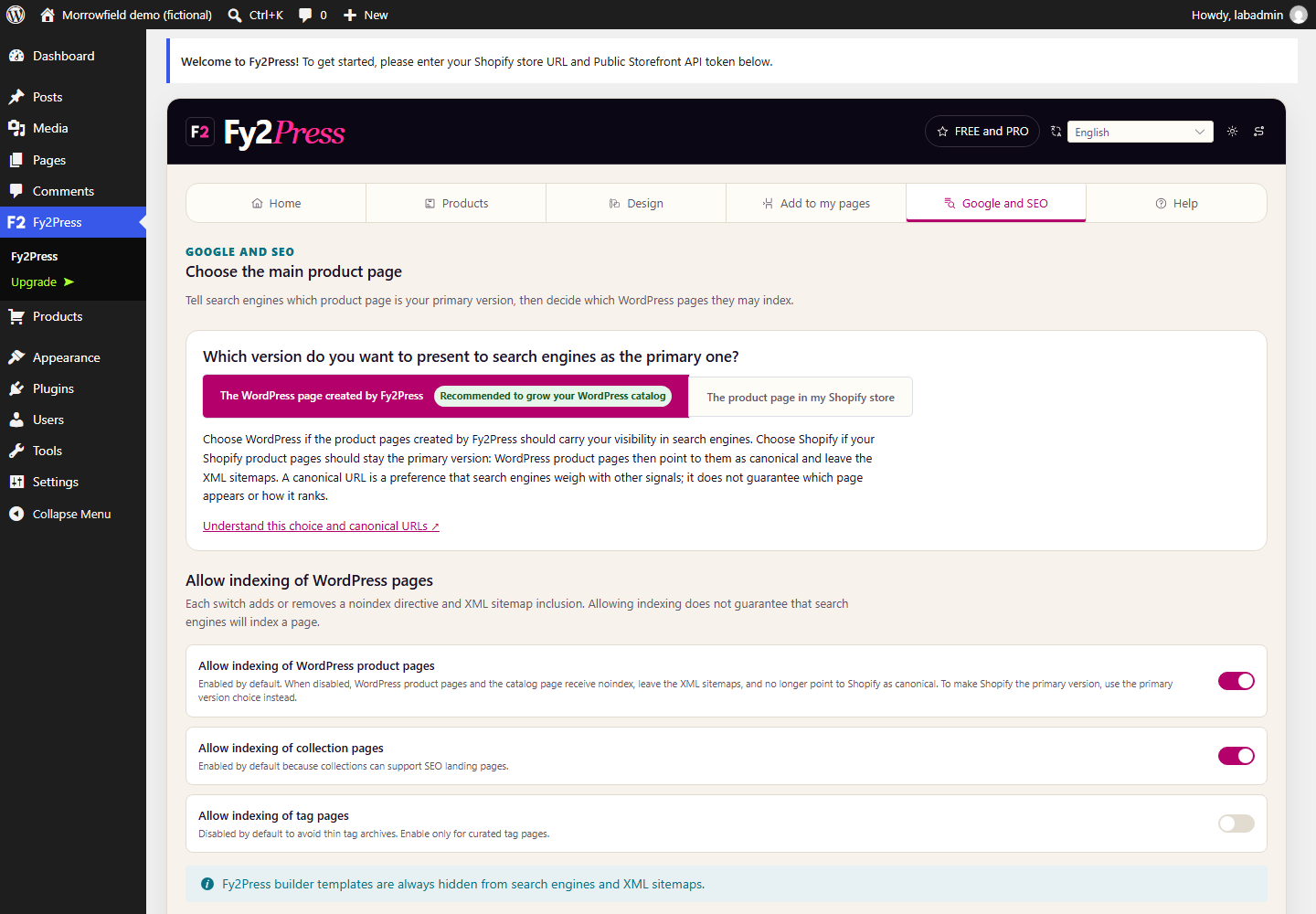
Fy2Press publishes the catalog of an existing Shopify store as WordPress content, while checkout stays on Shopify. Its Google and SEO tab, included in the free edition, is titled “Choose the main product page” and asks: “Which version do you want to present to search engines as the primary one?”
- The WordPress page created by Fy2Press is the default, marked “Recommended to grow your WordPress catalog”. Product pages declare themselves canonical.
- The product page in my Shopify store makes WordPress product pages declare the matching Shopify product page, on the store’s primary domain returned by Shopify, as canonical. Those pages also leave the XML sitemaps.
Under “Allow indexing of WordPress pages”, switches add or remove noindex and sitemap inclusion for product and collection pages (allowed by default) and tag pages (off by default, to avoid thin archives). Builder templates are always hidden from search engines.
Four details can change your decision:
- One setting covers every synchronized product page. Version 1.0.0 offers no product-by-product choice. Your articles and guides keep their own canonical.
- Shopify as the main version needs indexing allowed. With indexing of WordPress product pages turned off, they receive
noindexand no canonical link to Shopify is emitted; the tab warns about this combination. - Fy2Press changes nothing in your Shopify store. It does not edit the Shopify theme, its canonical or its sitemap, and creates no redirect.
- Decide before the first synchronization. New product pages are published directly, so on a public site set the main version and indexing first (Review and synchronize the catalog).
The plugin itself states the limit: “A canonical URL is a preference that search engines weigh with other signals; it does not guarantee which page appears or how it ranks.” Its SEO baseline is partial: it covers WordPress core and the Yoast, Rank Math, AIOSEO and SEOPress integrations, without guaranteeing every theme or plugin version. Each setting is detailed in Google and SEO.
Checklist: fill it in for one representative product
Copy this table for each pair of pages to decide. Use public URLs and test products, and leave out tokens, customer data and private addresses.
| Item | How to check | Shopify page | WordPress page |
|---|---|---|---|
| Final URL | Open it in a private window, note the address after any redirect | ||
| Product and variant | Title, handle or SKU, default variant | ||
| Role for the reader | Product page, guide, collection or other | ||
| Main content | Same description and images, or different material | ||
| HTTP status | 200 expected, no password page | ||
| Robots directive | index or noindex in the served page | ||
| Canonical in served HTML | View the page source, search for rel="canonical" | ||
| XML sitemap | Listed in that domain’s sitemap? | ||
| Internal links | Which URL do menus, articles and collections use? | ||
| Google-selected canonical | URL Inspection, indexed data only |
Decision: consolidate to Shopify, consolidate to WordPress, or keep both pages distinct.
Reason: one or two sentences based on the table, not on habit.
Who changes what: the Fy2Press Google and SEO tab, the Shopify theme, the SEO plugin, menus and links.
Review when: a page gains or loses substantial content, a domain changes, or the theme or SEO plugin changes.
How do you check the result after the change?
Read the page that visitors and crawlers receive, not only the settings screen. When settings and HTML disagree, trust the served response and find the theme, plugin or cache that overrides it. A WordPress product page canonicalized to Shopify should contain a line like this one (placeholder domain and product):
<link rel="canonical" href="https://store.example.com/products/trail-jacket">Then confirm that the page is absent from the WordPress product sitemap and that your articles link to the URL you chose.
If both domains are verified in Search Console, URL Inspection shows the “User-declared canonical” and the “Google-selected canonical”. Google states that “there is no guarantee that Google will choose this URL”, and the selected canonical appears only in indexed data; the live test cannot predict it (URL Inspection tool). If Google picks the other page, review similarity, links and sitemaps rather than adding noindex by reflex, and ask, as Google suggests, whether its choice serves searchers better. Without Search Console, record Google’s choice as unknown rather than inferring it from the tag.
What should you do next?
Fill in the checklist for one product, apply the setting on a test page and read the served HTML before extending the decision to the whole catalog. The Google and SEO guide covers each setting, and Shopify and WordPress together explains who does what between the two platforms.
Sources
- Google Search Central: How to specify a canonical URL with rel="canonical" and other methods
- Google Search Central: What is canonicalization
- Google Search Central: Fix canonicalization issues
- Google Search Central: Designing a URL structure for ecommerce websites
- Google Search Central Blog: Handling legitimate cross-domain content duplication (December 15, 2009)
- Search Console Help: URL Inspection tool
- Shopify.dev: Add SEO metadata to your theme
- Shopify.dev: Liquid object canonical_url
- Shopify Help Center: Finding and submitting your sitemap
Next step
Install the free plugin with the installation guide, or compare what FREE and PRO include.